I’ve made and posted a new version of Damon: The Rocket Jockey which adds an updated music track.
Updated Music
Off and on over the past several months, I’ve been working on a 3D voxel-art version of Damon for modern computers. It’s almost finished, but it has been for a while. One day I’ll finish it and make a post about it. It just needs a menu screen for configuring the controls. But, that’s not what this post is about.
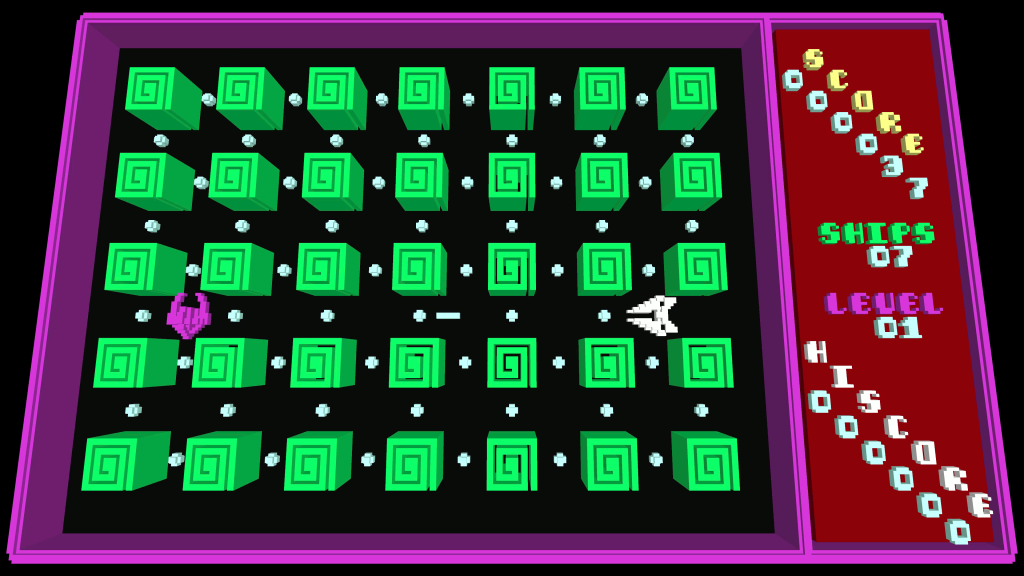
I mention the 3D game because as part of that project, I wrote an updated version of the game’s music. The original music, being for a 1980’s 8-bit computer, was a bit simple and repetitive. I thought I might be able to jazz it up a bit, so I gave it a shot in Ableton Live. I’m pretty pleased with the result.
Back-Porting
But, as I said, this post isn’t about the 3D game; it’s about the version for the Commander X16. I was looking through the VERA documentation recently, and I learned that it supports PCM audio. (VERA stands for Versatile Embedded Retro Adapter, and it’s the primary graphics and sound chip used by the Commander X16. PCM stands for Pulse-Code Modulation, which is a way of encoding digital audio.) I thought it would be fun to see if I could get the Commander X16 version of the game to play the music from the 3D game. There were a few challenges to overcome, but I was ultimately able to get it working.
Resolution Reduction
PCM audio is made up of a sequence of “samples”, each of which represents the value of the audio waveform at an instant of time. For example, CD-quality audio and the Damon 3D music both use two channels of 16-bit samples (-32,768 to 32,767) at 44,100 Hz (samples per second). Doing the math, this ends up taking 176,400 bytes per second, or just over 10.5 MB for a minute of audio. While this is trivial for modern computers, it’s way too much for something like the Commander X16.
The VERA PCM system supports a sample rate of up to 48,828.125 Hz (25 MHz / 512), and the rate can be configured by specifying a value between 0 and 128, inclusive, scaling linearly between 0 Hz (no playback) and the maximum rate. After playing around a bit, I settled on the value 21, which gives a rate of approximately 8,010.86 Hz. I used Audacity to resample the audio from 44,100 Hz to 8,011 Hz, which is close enough.
With this sample rate reduction, by mixing the stereo down to mono, and by using 8-bit samples instead of 16-bit, 1 second of audio can be brought from 176,400 bytes/second down to 8,011 bytes/second, a roughly 95.5% reduction in size! This obviously reduces the audio quality, but surprisingly, it sounds pretty okay despite the severe reduction in resolution.
One interesting thing to note is that the WAV file format treats 8-bit samples as unsigned offset binary, but VERA treats 8-bit samples as signed two’s complement. To handle this difference, it was necessary to write a python script to parse and convert the PCM data from the WAV files.
Tempo Adjustment
The new version of the music was rendered at 120 bpm. The original music was a bit faster, at 148 bpm. Since I wanted the player to be able to switch between the two versions of the music, I needed the two versions’ tempos to match up. With all the extra percussion in the new version, I felt like it sounded right at 120 bpm, so I adjusted the game code to generate the older music at that tempo as well.
I think the older music is a little better at the faster tempo, but that would probably be too fast for the new music, and it seems more important to have the two versions sync up.
Clip Sequences
To reduce duplication of redundant sections of audio, and to have more control over what parts of the music get played when, I broke the audio up into 1-measure clips, which at 120 bpm are 2 seconds each. For example, the music includes several measures of the bass line playing with no melody over it. There’s no need to store more than one of those. Similarly, other musical phrases are repeated in the song, and the game only stores a single copy of each distinct phrase.
There are a few other special-purpose audio clips, such as the ominous drone as the letters slide in on the title screen, and the level start and level complete music. Each of these is stored in its own file as well.
The audio clip files are stored in the same filesystem directory as the main program, and the first thing the game does is load each of them from disk into high memory. A stock X16 has 512 kiB of memory, and this is expandable to 2 MiB. All the clips together, after the resolution reduction, use about 220 kiB, so there was no problem fitting them all in. High memory is banked in the Commander X16, each bank appearing at $A000–$C000 when it’s selected. This didn’t present significant difficulty, as the PCM data is mostly read sequentially.
To handle the sequencing of audio clips I wrote a small interpreter with instructions to do things like “play this clip” or “jump to this other part of the sequence”, which made it much simpler to manage the clips and play the right one at the right time. I discussed the interpreter technique briefly in my previous post. If you’d like more information about this, you’re welcome to check out the source code on github, or ping me directly.
Gameplay Video
Here’s a short recording I made with the X16 emulator of the game using the new music. To compare this to the previous music, check out the gameplay video in my previous post.
Conclusion
I’m quite pleased with how this experiment turned out. I think it adds a bit more fun to the game. If you’d like to try it yourself, you can find it at natebarney.com/damon or on the Commander X16 forums. The source code is available at github.com/natebarney/damon-the-rocket-jockey.

Leave a Reply